About APP
SPLACH SCREEN
Quick splash screen welcomes users while application loads essential startup resources.
- A splash screen is the introductory display shown immediately after launching an application or software.
- It usually contains the app logo, brand identity, and simple graphics to create a professional first impression.
- During this short loading period, the app initializes background processes, resources, and configurations before opening the main interface.
- A clean and attractive splash screen improves user experience and strengthens brand recognition effectively.
- A Splash Screen is the first screen that appears when an app or software is opened. It shows for a few seconds while the app is loading
- A splash screen helps reduce perceived loading time and keeps users engaged during application startup.
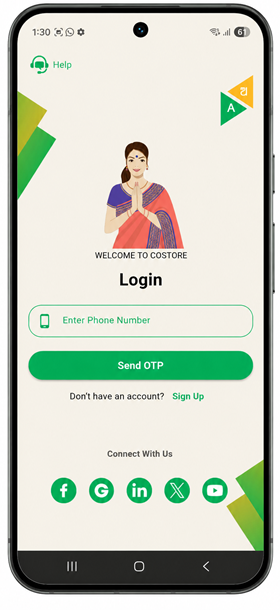
LOGIN PAGE
Secure Login System Protects User Access And Personal Information
- The Login Page is used to verify the user’s identity and allow only authorized people to access the application.
- It provides secure access by asking users to enter their registered mobile number, email, or password.
- The login process helps protect personal information and prevents unauthorized access to the system.
- A well-designed login page improves security, user experience, and smooth navigation within the application.
- Allows only registered users to enter the application.
- Improves application security and privacy.
- Creates a smooth and user-friendly login experience.
User Registration
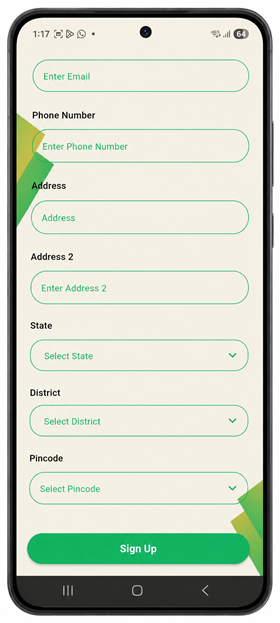
Secure registration form for collecting user details and creating application accounts
- The Registration Page is used to collect user information and create a new account in the application.
- It allows users to enter personal details such as email, phone number, address, state, district, and pincode.
- The registration process helps maintain user records securely and provides access to application services and features.
- A simple and user-friendly registration page improves accessibility, accuracy, and overall user experience.
- A secure registration process protects user information and supports better privacy and authentication management.
- Modern registration pages may also include OTP verification, password protection, and email confirmation for additional security.
OTP Verification
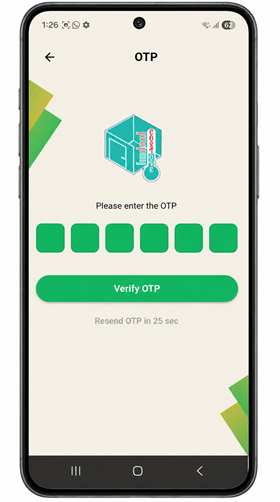
SecureOTP verification process for safe user authentication and account access.
- OTP verification confirms the user’s identity securely before allowing access to the application and protected system features safely.
- It provides an additional security layer to prevent unauthorized users from accessing personal accounts and sensitive information.
- Users receive a one-time password through mobile number or email for quick and secure authentication purposes.
- The OTP screen ensures secure login, registration, password recovery, and account verification within the application environment effectively.
User Dashboard
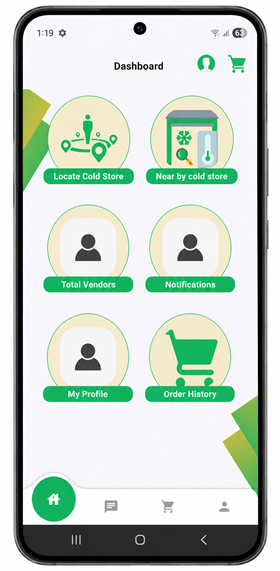
Interactive dashboard for accessing application features, services, and user management options.
- The dashboard provides quick access to important application features and services through a simple and user-friendly interface design.
- Users can locate nearby cold storage facilities easily using location-based services integrated within the application dashboard system efficiently.
- The dashboard displays vendor details, notifications, profile information, and order history for better account and activity management.
- A responsive dashboard design improves navigation, enhances accessibility, and provides a smooth experience across different mobile devices efficiently.
- Notification features keep users updated about important activities, alerts, service updates, and application-related information regularly and securely.
Cold Hub
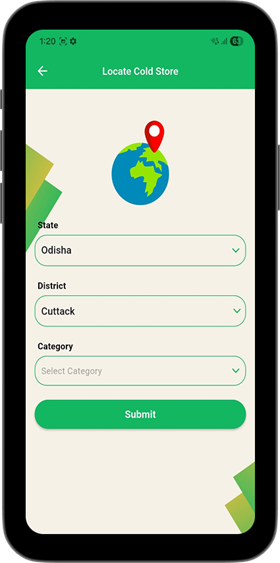
Find Nearby Cold Storage Locations Across Odisha Quickly
- Users can easily search cold storage facilities by selecting state, district, and storage category options quickly.
- The application provides a simple and clean interface for smooth navigation on all mobile devices.
- Farmers and businesses can locate nearby cold storage centers for better product preservation and transportation management.
- Dropdown selection options help users filter accurate cold storage information without typing complicated search details manually.
- The platform supports organized storage discovery to reduce wastage of vegetables, fruits, dairy, and agricultural products.
Category Selection
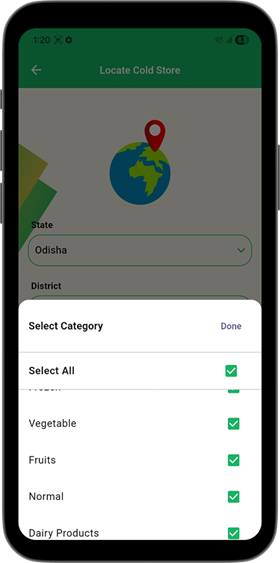
Choose Multiple Cold Storage Categories Quickly Using Smart Selection Feature
- Users can select multiple cold storage categories easily through a convenient and organized category selection interface menu.
- The multi-select option allows faster filtering of suitable storage facilities based on different product storage requirements efficiently.
- Farmers can choose vegetable, fruit, dairy, and normal storage categories according to their agricultural product preservation needs.
- The clean dropdown design improves user experience and simplifies category selection for both beginners and regular mobile users.
- The clean dropdown design improves user experience and simplifies category selection for both beginners and regular mobile users.
Storage Listings
Browse Nearby Cold Storage Facilities With Ratings and Location Information
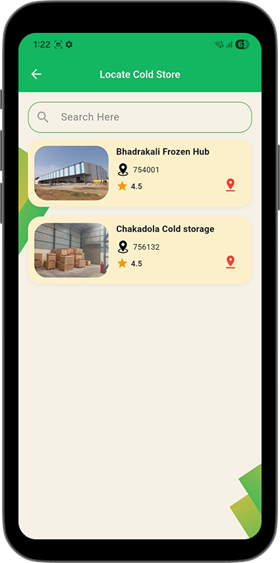
- Users can view nearby cold storage facilities with images, ratings, and location details in an organized mobile-friendly listing format.
- The search bar allows quick filtering of cold storage centers based on user preferences and specific storage requirements instantly.
- Each storage listing displays important information including postal code, ratings, and facility identification for easier selection decisions.
- Attractive card-based design improves readability and helps users compare multiple cold storage facilities quickly and efficiently anytime.
Storage Details
View Complete Cold Storage Information With Capacity and Availability Details
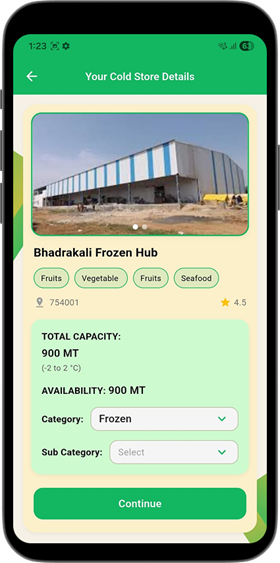
- Users can view detailed cold storage information including images, categories, ratings, and location details in one organized interface.
- The application displays total storage capacity and available space for better inventory and product management planning purposes.
- Multiple product categories like fruits, vegetables, seafood, and frozen items are clearly highlighted for easy identification and selection.
- Dropdown options help users choose suitable storage categories and subcategories according to their product preservation requirements efficiently.
- The detailed storage page improves decision-making by showing accurate facility information before booking or continuing further processes online.
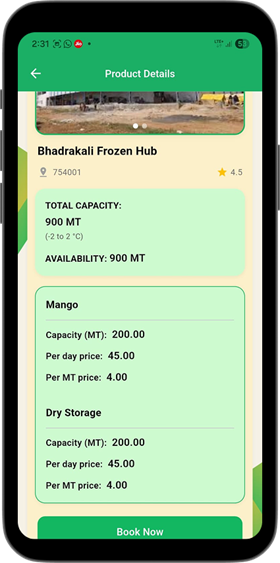
Product Details
View Product Capacity Pricing and Storage Availability Information Easily
- Users can view detailed product storage information including capacity, pricing, and availability within selected cold storage facilities easily.
- The application displays per day pricing and per metric ton charges for transparent and accurate storage cost management.
- Product sections clearly separate different storage types, helping users understand available options for agricultural and commercial products quickly.
- Storage availability details help farmers and businesses plan inventory management and transportation processes more effectively and efficiently daily.